Deploying a SynQt system
synqt dev runs everything on one machine, with a throwaway CA and plaintext HTTP on
localhost. A deployment differs in four ways: real certificates, real secrets, real TLS to
the browser, and something that keeps the processes running. This page covers the whole
path, in order, for a system with a web edge and a database entity. All of it applies to
any hosting provider.
This is the reference to keep open during a deploy. For a walkthrough with the reasoning, Shipping it takes the tutorial's auction onto two hosts, and adds the pipeline, the release and the rollback.
Running in containers covers a different case: running a system on a machine with nothing installed, with a certificate authority created and discarded inside the compose project. This page is about a system other people depend on.
A SynQt deployment is a project directory. Every entity binary finds its runtime files
relative to the directory it starts from, exactly as synqt.yaml spells them: its topology
under build/<entity>/, its certificate under synqt/mesh/, its secrets in its own
.env, and, for the edge, the client bundle under build/client/. A binary copied out of
that tree looks for all of them in the wrong place.
1. Ask the production question before you build
Plain synqt check validates the topology you develop against. --release adds the rules
that apply only to a shipped system, which are worth failing on early:
- the web edge must have a
tlsblock, or declare that a proxy in front of it terminates TLS; - a mesh link across hosts may not drop mutual TLS;
- a desktop client's
edge_urlmust bewss://; - an external provider may not connect in plaintext.
Validation has the full list.
Run it against the configuration you will deploy, usually with the profile that holds the production differences:
A synqt.production.yaml beside synqt.yaml holds the public port, the certificate paths
and any cross host address, layered over the base file for that run. That keeps one
topology instead of two copies. See
configuration resolution order.
2. Issue the mesh certificates
Service entities trust each other only through certificates, even on one host. They authenticate with mutual TLS against a private CA on every link, loopback included, so the CA must exist before anything starts.
synqt mesh init          # once per project, on a machine you control
synqt mesh cert --all    # one certificate and key per service entity
synqt mesh status        # validity windows, and a warning before expiry
Where each file goes matters more than the commands:
- The CA private key never leaves the machine that issues certificates. It is never copied into an entity or committed to the repository. For a team or a pipeline, keep it in a secret store, and issue certificates as a manual step, not as part of a build.
- Each host gets only its own entities' files:
<entity>.crt,<entity>.key, andca.crtto verify peers. A database host has no reason to hold the edge's key. - The client entity gets no certificate. A browser authenticates with a user session, never with a mesh identity, and the two never substitute for each other.
An entity configured for transport: mtls without an issued certificate refuses to start
and prints the command that fixes it. The check runs at start, not at build, because the
CA must not be on the build machine.
3. Build
This compiles every entity with the pinned toolchain and writes one directory per entity:
build/
  client/                 # the WebAssembly bundle, precompressed, plus its licenses
  edge/                   # the edge binary, its topology.json, its licenses
  store/                  # the database binary, its topology.json, its licenses
  process-manifest.json   # the start plan (see below)
A service directory is small: the binary, the topology.json it reads at startup, and its
licenses. The edge and the services load their QML at startup from the copy synqt build
writes under generated/, so that directory is part of what a host needs. An entity's data does not
move into build/. A relational entity applies db/relational/store/schema.sql and opens
the file its settings name (db/relational/store/data/app.db by default), both relative
to the project root and inside the entity's own directory. That is why synqt clean,
which removes build outputs, cannot delete a database.
Each entity directory has its own THIRD-PARTY-LICENSES, generated from what the entity
links. Under open source Qt, the build also reminds you that the client is conveyed to
every visitor and is therefore GPLv3, and that distributing the edge binary triggers GPLv3
too. These are obligations; licensing says how to
meet them.
A build machine needs no certificates and no CA for any of this, which is why step 2 runs elsewhere.
4. Copy the tree, keep the shape
A host needs the project root, trimmed to that host's entities:
myapp/
  synqt.yaml
  synqt.production.yaml
  synqt/mesh/             # this host's certs and ca.crt only
  build/
    <entity>/             # the binary and its topology.json, one per entity running here
    client/               # only on the host whose edge serves the bundle
  generated/<type>/<entity>/  # the QML that entity loads at startup
  <type>/<entity>/        # the same entity's runtime files: .env, schema.sql, data/
Entity source directories travel too, but only for files an entity reads at run time. On
a deployed host, a relational entity's folder holds its .env, schema.sql and data/;
the QML it runs is the copy under generated/. Every path in topology.json is relative
to the project root, so the tree works wherever it lands, as long as each entity starts
there. synqt.yaml travels because the entities use the paths it spells.
Service binaries leave Qt out: synqt build runs no deployment step for them, so a
service host needs the pinned Qt kit, either in a container image or installed at the
path the build used. (The desktop client is the exception; see step 9.) A container image
built from the same base as your build machine is the least surprising option.
5. Place the secrets
A secret value appears in synqt.yaml only as a reference,
password: env:DB_PASSWORD, resolved at start from the entity's own env file, then the
project's. Two rules enforce this where it matters most: a provider password or connection
URI, and an identity provider's client_secret, must be env: references; and any env:
reference reachable from a client target is rejected, so a secret cannot reach the browser
by being named in the wrong section.
On the host, write db/relational/store/.env and web/edge/.env with the values the
references name, readable only by the user the entities run as. Each entity directory's
.env.example lists them. In a pipeline, SYNQT_<SECTION>_<KEY> environment variables
cover overrides of a top-level section that are not secret
(SYNQT_SECURITY_HANDSHAKE_TIMEOUT_MS=5000), a profile file covers an entity's settings
(its port, its address), and your orchestrator's secret mechanism covers the rest.
6. Start it
Every build writes build/process-manifest.json, the start plan:
{
  "start_order": ["store", "edge"],
  "processes": [
    {
      "entity": "store",
      "binary": "build/store/store",
      "bind": "loopback",
      "mesh_cert": "synqt/mesh/store.crt",
      "mesh_key": "synqt/mesh/store.key",
      "ca_cert": "synqt/mesh/ca.crt"
    },
    {
      "entity": "edge",
      "binary": "build/edge/edge",
      "bind": "public",
      "mesh_cert": "synqt/mesh/edge.crt",
      "mesh_key": "synqt/mesh/edge.key",
      "ca_cert": "synqt/mesh/ca.crt"
    }
  ],
  "client_served_from": {"app": "build/client/"}
}
It answers a supervisor's three questions:
start_orderlists owners before consumers, so an owner is up before its consumers try to acquire a replica. Consumers retry, so the order is a convenience: starting out of order turns a clean boot into a wait.bindsays which entities face the public interface (the web edges, and a monitor whose console is bound off loopback) and which stay onloopback.- Each entry names the files that entity expects. Check them before deciding a start failure is a code problem.
client_served_from names the directory each browser client's bundle is in, by client.
For a quick run on one host:
synqt serve starts each entity from the project root in that order, then returns. It
leaves supervision to you, so an entity that dies stays down. Use it to bring up a
staging machine by hand. For anything that must stay up, use systemd, an orchestrator or
another process manager, fed from process-manifest.json. synqt serve passes --dev to
nothing, which keeps the development sign-in
and the plaintext localhost link out of a deployment.
7. The public edge
The internet reaches the web edge and nothing else. Two things must hold, and validation enforces the first:
- The configuration says where TLS terminates. Either the edge has
tls.cert_fileandtls.key_fileand terminates TLS itself, or it declarespublic.tls_terminated_upstream: truebecause a reverse proxy in front of it does. A release build with neither is refused. - Everything else binds to a private interface. Mesh links use mutual TLS everywhere, so a database exposed by accident still refuses strangers, but mutual TLS should not be the only thing keeping it private. See network segmentation and the database.
The edge sends the browser hardening headers itself, computed from the topology: the
Content-Security-Policy, with the sync endpoint's wss:// origin in connect-src, and,
for a multi threaded client, the COOP and COEP pair that cross origin isolation needs.
The headers need no configuration, but since they come from the edge, a proxy that
rewrites response headers can break the client. See Content-Security-Policy.
To serve the bundle from a CDN instead of the edge, first read serving the client from another origin. It is supported and validated, but deprecated, because of browser cookie policy.
8. Running more than one edge
One edge process serves many clients, which is enough for most systems. When it is not, run the edge as N interchangeable processes behind an ordinary load balancer. It is opt in, with one key:
  - name: edge
    type: web_edge
    replicas: 4
    public:
      origin: https://app.example.com
      trusted_proxies: [10.0.0.1]
      tls_terminated_upstream: true
synqt docker init then writes N services from one image, with a
docker/nginx.conf in front, and only that front publishes the edge's port (with several
replicated edges, each gets its own <edge>-front and docker/nginx-<edge>.conf). The
generated file does the four things any balancer must do:
- pass the WebSocket upgrade through;
- put the visitor's address in
X-Forwarded-For; - keep the read timeout above the heartbeat;
- prefer the replica with the fewest open connections over round robin (a browser link is long lived, so balance how many are open, not how many were handed out).
A replicated edge is a front
synqt check enforces this: with replicas: > 1, every connect point the edge owns needs
behind:. The edge carries the session
and hands each caller to the entity that answers them, which is one process whichever
replica the caller reached. A point the edge implements itself keeps its props and rows in
one process, so two tabs of one session on different replicas would silently see
different values.
The other three refusals concern state that was per process and no longer can be:
| Refused | Why |
|---|---|
identity configured without identity.provider_entity |
Sessions would live in whichever process minted them, so a visitor is signed in on one replica and anonymous on the next |
No public.origin |
Each replica is reached at the balancer's origin rather than its own, and nothing else can work that out |
An embedded identity.device.store (sqlite, memory) |
A device credential enrolled through one replica cannot be redeemed through another |
A missing public.trusted_proxies is a warning, not an error. The system runs, but every
per IP cap and rate limit sees the balancer instead of the visitor, and counts all
visitors as one.
What does not scale by raising the number
These pass synqt check without a warning:
- State in an edge singleton is per replica. The rule above covers connect points, but
an edge singleton can still hold state that a remote page route or an
Apihandler reads, and each replica has its own. The multiplayer arena shows the problem: replicate it and you get N separate worlds that know nothing of each other. Such an app scales by sharding players across edges, not by replicating one. Caller.emitto a session reaches only the replica holding that connection. Notifying one user from an entity works per connection.- The device route's rate limit is per replica, so its budget is multiplied by the replica count. It controls cost and is not the security boundary (the credential is 256 random bits), so a shared write per attempt is not worth it.
Running one edge on more than one core
Alternatively, a single edge can spread its accepted browser sockets across IO threads in one process, which suits some systems better than replicating. It is also opt in, with one key:
Each browser connection goes to one of the four threads when accepted and stays there.
Everything else stays on the main thread, as with threads: 1: each connection's QtRO
host, the Sources it acquires, the QML engine and the entity singleton.
Choose between the two keys by how they differ:
replicas: N |
threads: N |
|
|---|---|---|
| What it multiplies | Processes, behind a balancer | Socket threads, in one process |
| What it asks of the project | Every owned point needs behind:, identity promoted, a shared device store |
Nothing |
| Shared state | None, each process is on its own | All of it, one singleton and one set of Sources |
| Survives a process dying | Yes, the others carry on | No |
| Scales past one machine | Yes | No |
The multiplayer arena, which replication would split into N
separate worlds, suits threads:: one authoritative world, simulated once, with the cost
of sending each player their slice spread over four cores. A plain request based app that
already meets the front rules suits replicas: better, and survives losing a machine.
The keys combine, and neither implies the other: N replicas of an edge with threaded sockets are N processes, each using several cores.
What the two keys buy
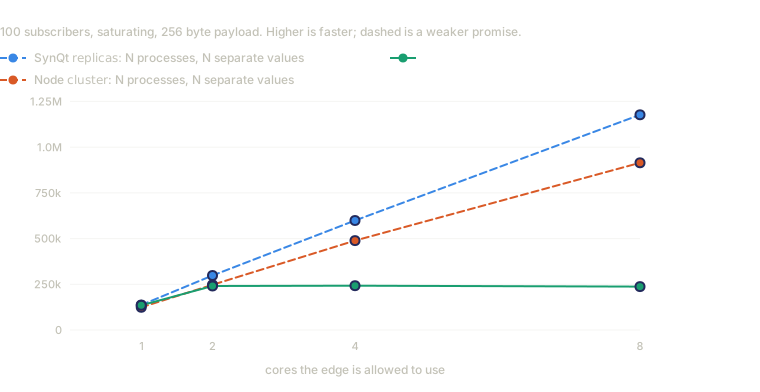
One publisher, 100 subscribers, saturating, 256 byte payload; 32 core Linux host, Qt 6.12.0,
Node 24.20.0, one session. Reproduce it with benchmarks/vs-frameworks/run-bench.sh
and benchmarks/vs-frameworks/sweep.py.
| cores | replicas: N |
Node cluster |
threads: N |
|---|---|---|---|
| 1 | 136 433 | 124 117 | 135 200 |
| 2 | 298 258 | 247 242 | 240 783 |
| 4 | 598 533 | 488 696 | 242 400 |
| 8 | 1 176 750 | 914 302 | 237 150 |
Compare the two dashed lines with the solid one, not with each other. Processes scale almost linearly, about equally well for SynQt and Node, but they scale N separate systems. At eight processes there are eight publishers holding eight values, and delivering one value to every subscriber from all of them needs a broadcast between processes that these numbers do not include.
The solid line keeps one shared value, and it flattens: 1.78x from one core to two, level
at four, slightly lower at eight. threads: gives about two cores of delivery for a value
every subscriber must agree on, which replicas: cannot serve at all, and no more. The
limit is the Source, which still runs once on the main thread: serializing a change is
work more sockets cannot share.
What threads do not speed up. The Source still runs once, on the main thread, so an owner that is slow to compute what it publishes stays exactly as slow with four threads. Threads take the per connection delivery cost off the main thread, which is where most of the time goes when fanning out to many browsers. If a profile shows your edge busy in QML rather than in its sockets, this key will not help.
Give it the cores. SynQt cannot check that the machine has them. A container with a one CPU quota runs four socket threads without complaint and gains only context switches. Set the number from the CPU the process may use, not the host's core count.
Message size. Writes to one connection in the same pass of the event loop travel
together as one WebSocket message, so security.max_message_bytes also caps how large a
batch can grow, with nothing extra to configure. A single message already over that limit
still goes alone, as it does without threads.
One thing your entities do to their own event loop
On Linux, Qt uses GLib's event dispatcher whenever GLib is installed. Every service, web
edge and monitor SynQt generates asks for the polling dispatcher instead, in the first line
of the generated main, before the application is constructed, because that is when Qt
chooses the dispatcher.
The reason is fan-out. GLib keeps every watched descriptor in one poll list, and a socket adds and removes itself from that list whenever it has bytes waiting to be written. Publishing one value to N subscribers writes to N sockets in one pass, so N sockets each walk a list of length N, and the event loop's cost grows with the square of the subscriber count. On the framework comparison, the polling dispatcher delivers 18% more at ten subscribers, 33% more at one hundred and 52% more at two hundred and fifty. Each toggle has a fixed cost and a cost that grows with the list, and the growing gap points to the second.
GLib's dispatcher exists to share an event loop with a GLib program, in practice GTK, which lets a desktop application use the platform's native file and color dialogs. That matters only to a client, so a desktop client keeps the platform default and only the headless entities change.
To restore GLib, set the variable Qt reads; SynQt does not override it. Qt treats any non empty value as "no GLib", so restoring GLib takes an empty value, not a zero:
9. Desktop clients, if you ship one
A desktop client is built per host platform and deployed separately from the services:
--deploy runs the platform step that bundles Qt with the app (macdeployqt,
windeployqt, or a portable layout on Linux), and requires you to state your signing
intent, because an unsigned binary costs something different on each platform. The result
lands under build/client-desktop/<platform>/, with a DEPLOY.txt naming what is still
left to do, notarization included. Desktop clients
covers the details.
The desktop client changes nothing above. It reaches the same edge over the same wss://
link, holds no secret and no mesh certificate, and uses the same user sessions.
10. Before you call it done
Run the security checklist. It is short, meant for deploy time, and covers the few things that are easy to get right in development and easy to lose on the way to a server.
Then run synqt doctor --profile production on the host. It reports the resolved
toolchain, which entities have a certificate, any selected provider whose driver or client
library is missing, and your Qt license mode with its obligations. To see how long the
certificates remain valid, run synqt mesh status.